Watchman icon

Watchman

Security for the AI era.

It finds the attacks your antivirus doesn't look for. Poisoned files that hijack your AI. Agents with too much access. Booby-trapped models. Voice-clone scams. All checked on your Mac, never uploaded.

One payment. Lifetime updates. No subscription.

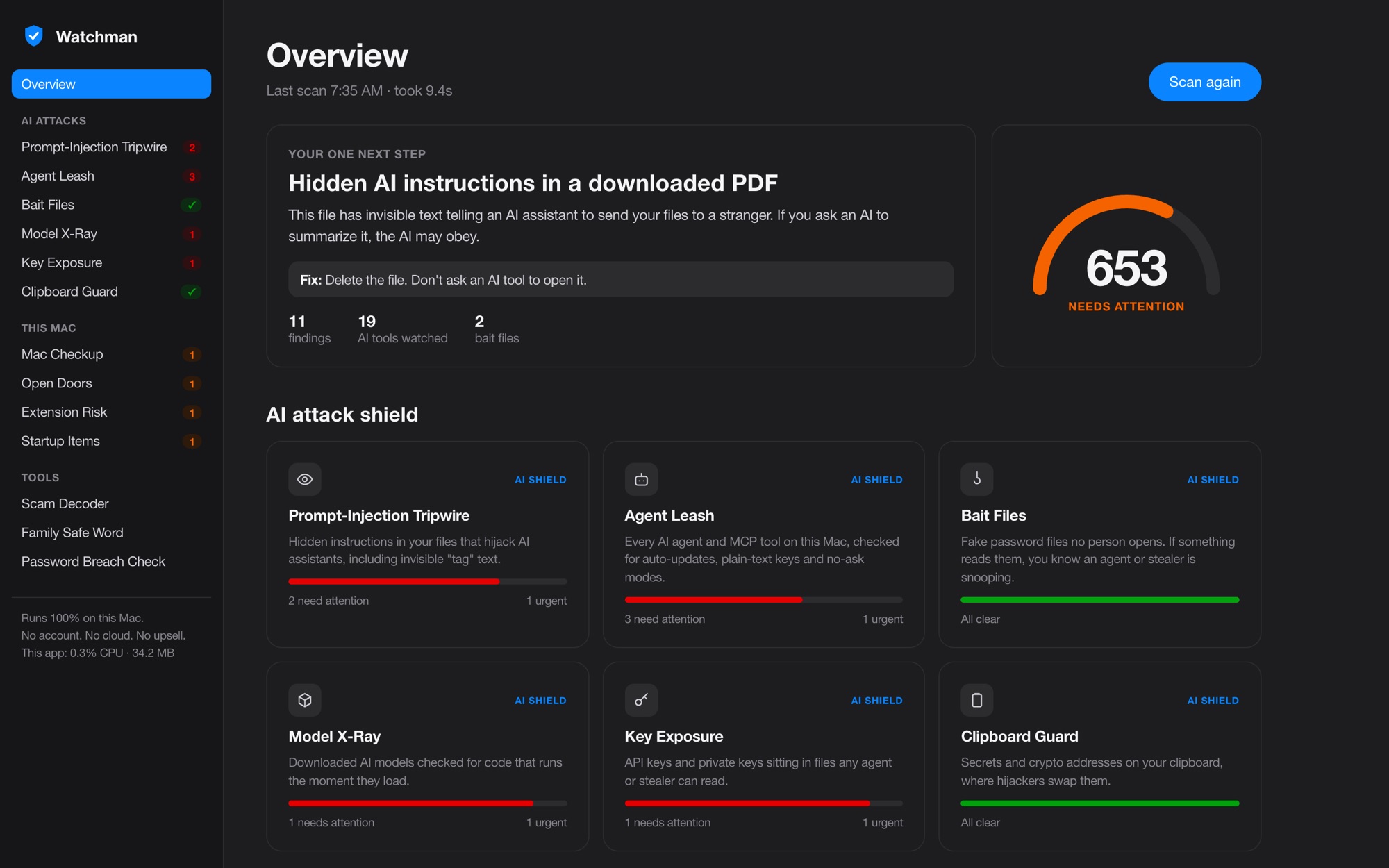
Watchman overview: a security score of 653, one next step, and the six AI attack shields

Why it exists

Your AI reads everything. So do the people attacking it.

You hand files to Claude, ChatGPT and Cursor all day. One hidden line in a PDF can tell them to mail your files to a stranger. Bitdefender, Norton and the rest don't check for that. Watchman does.

Six AI attack shields

Built for what's new.

Prompt-Injection Tripwire

Catches hidden orders to your AI.

Scans your Downloads, Desktop and Documents for instructions aimed at AI tools, including invisible "tag" text no human can see.

Agent Leash

Audits every AI tool you've connected.

Checks Claude Code, Claude Desktop and Cursor for tools that auto-update, keys saved in plain text, and agents set to run without asking.

Bait Files

Sets a trap for snoops.

Plants two fake password files no person ever opens. If something reads them, you know an agent or a stealer is going through your things.

Model X-Ray

Opens AI models safely.

Downloaded a model file? Watchman reads it without loading it and flags any that run commands the moment they open.

Key Exposure

Finds keys left lying around.

API keys and private keys sitting in readable files. It shows only the first and last few characters, so the report never leaks them either.

Family Safe Word

Beats the voice-clone call.

A scammer can copy your son's voice from one video. They can't copy a word your family picked in person. Watchman makes one and tells you how to use it.

Agent Leash

Know what your AI can touch.

Most people install an AI tool, click allow, and never look again. Watchman looks for you. Then it tells you the exact fix.

  • Whole-home access. A tool that can read every file you own, not one project.
  • Auto-updating tools. If the package gets hijacked, your AI runs the attacker's code.
  • No-ask mode. Agents set to run commands without checking with you.
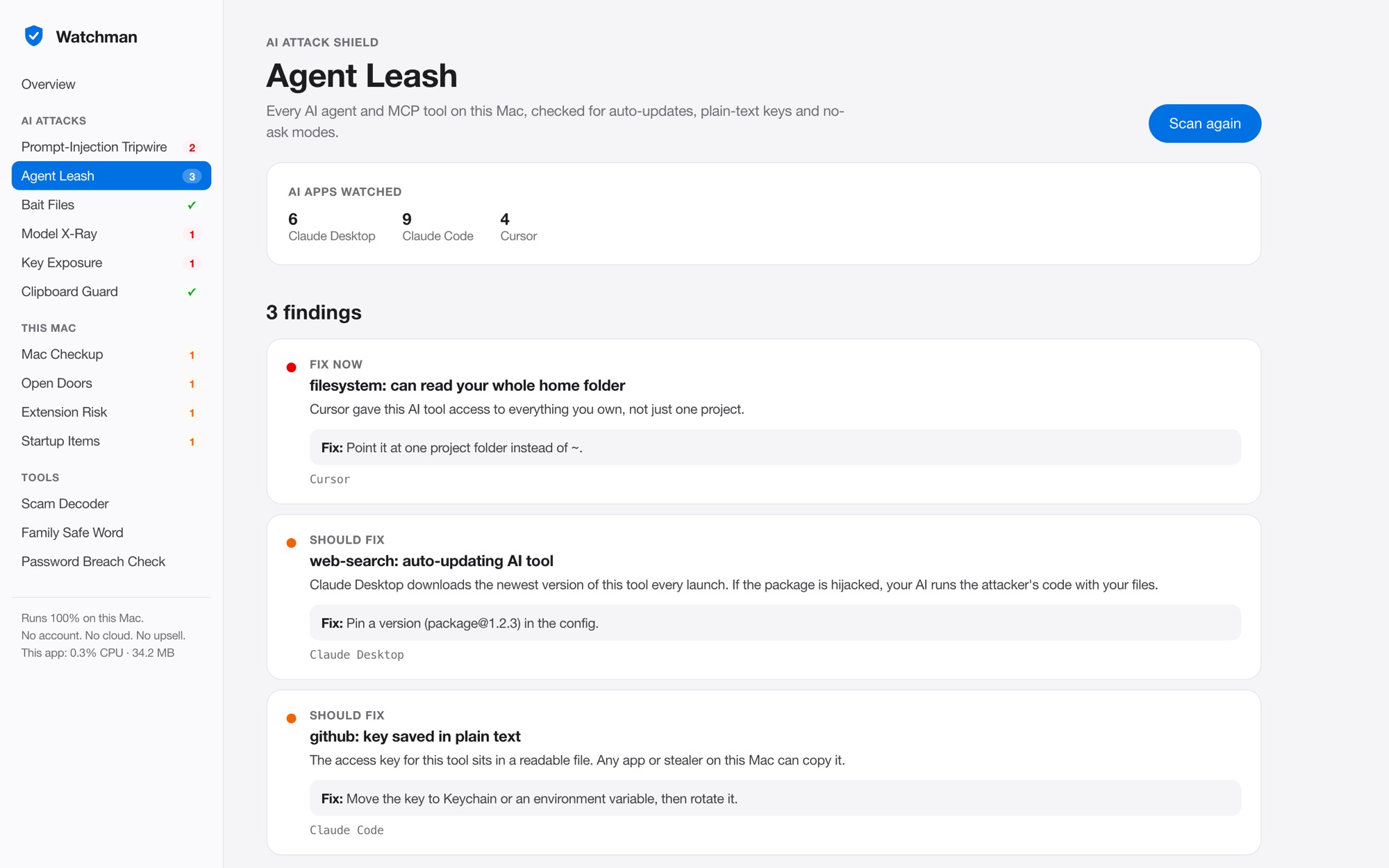
Agent Leash showing three findings across Claude Desktop, Claude Code and Cursor

Plain English

Every alert says what, why and how to fix it.

No threat codes. No wall of red. One score, one next step, and a fix you can do in a minute. It's built so your mom could use it.

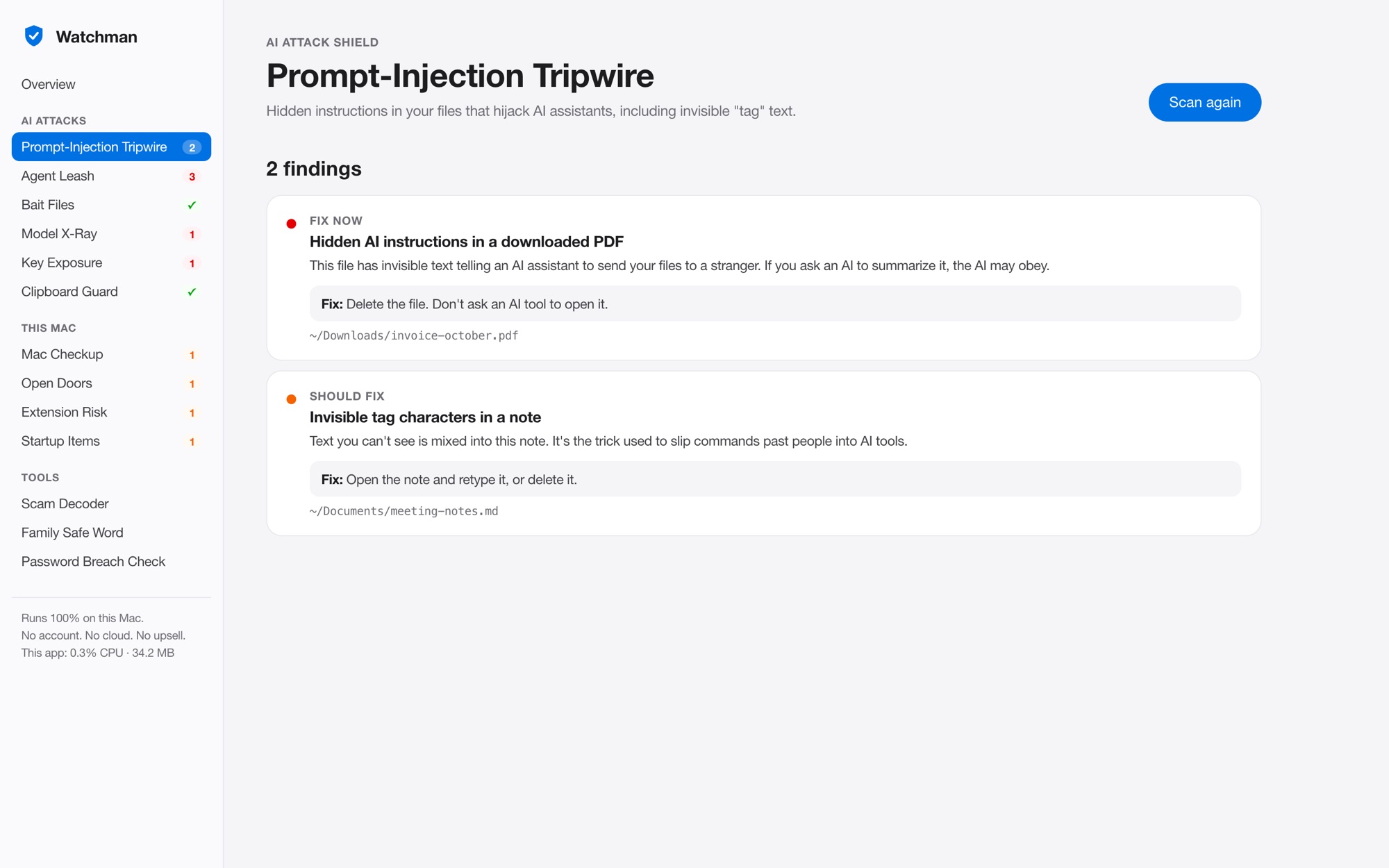
Prompt-Injection Tripwire finding hidden AI instructions in a downloaded PDF, with the fix

Scam Decoder

Paste it. Get a straight answer.

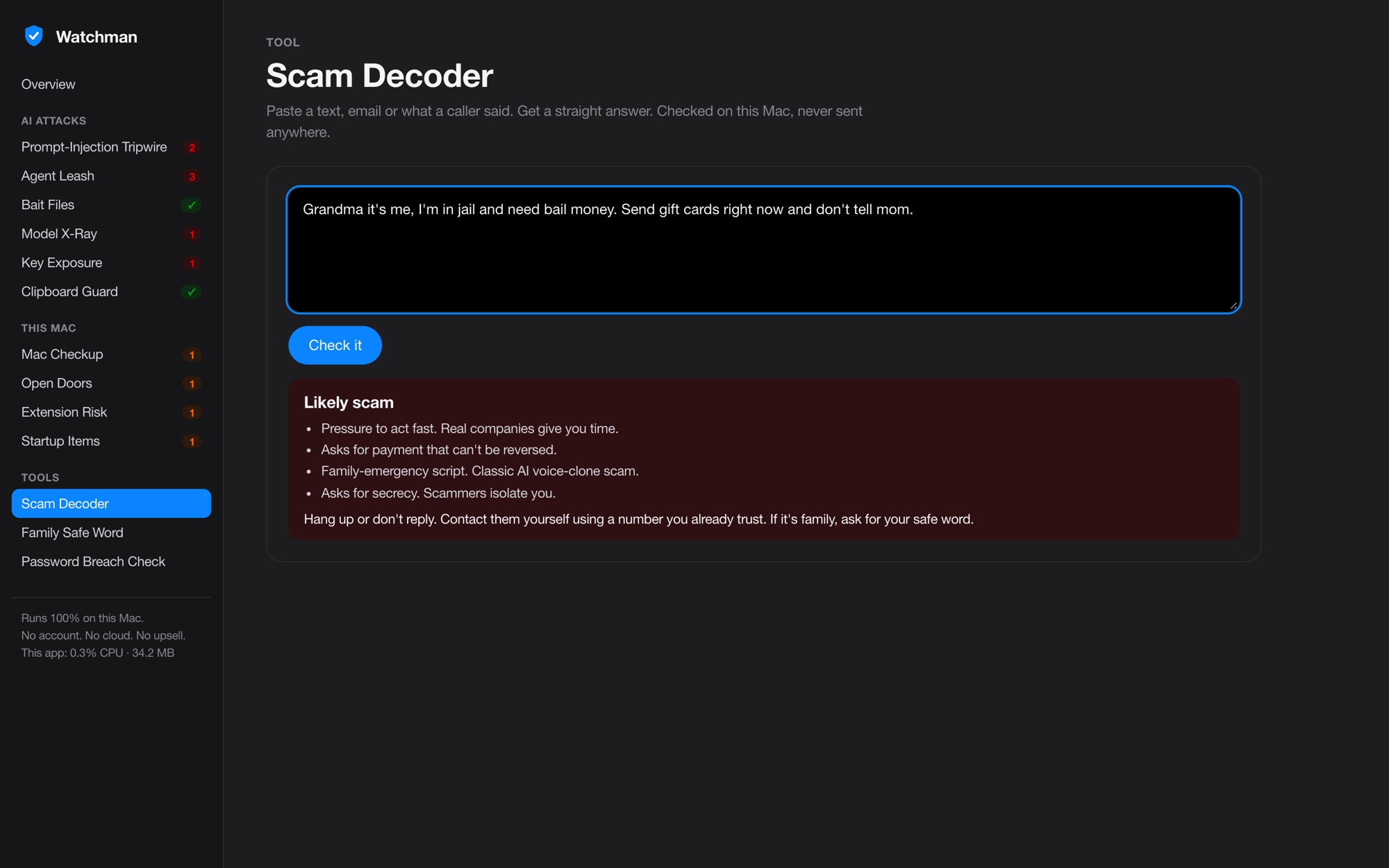
A text from "the bank." An email about your package. What the caller said. Watchman checks it on your Mac, instantly, and tells you why.

Scam Decoder marking a family-emergency gift card message as a likely scam, with four reasons

Plus the basics, done right

Nine things people ask for.

100% local

No account. No uploads. No telemetry. Your scan stays on your Mac.

Light, and it proves it

Under 40 MB of memory, even mid-scan. It shows its own CPU and memory use, live.

One score, one next step

A 0 to 1,000 score and the single most important fix, up top.

Password breach check

Checks if a password has leaked without ever sending the password.

Browser extension audit

Flags extensions that can read every page you visit, bank included.

Open Doors

Finds apps strangers on the same Wi-Fi can reach.

Startup Items

Shows what launches at login, and which of it is unsigned.

Mac Checkup

FileVault, firewall, Gatekeeper, SIP and updates. One look.

No upsells. Ever.

No "premium" tier. No auto-renew trap. You own it.

Compare

Different job. Different tool.

FeatureWatchmanBitdefender for Mac
Hidden AI instructions in filesYesNo
Audits AI agents and MCP toolsYesNo
Bait files for snooping agentsYesNo
Booby-trapped AI model checkYesNo
Voice-clone scam defenseYesNo
Classic virus signaturesNoYes
Price$49.99 onceYearly subscription

Watchman isn't a virus scanner, and it doesn't pretend to be. macOS already blocks known malware with XProtect. Watchman covers what nobody else checks.
Bitdefender column based on its published Mac features, October 2026.

Watchman for Mac

$49.99

Pay once. Keep it forever.

Secure checkout by Stripe. Download starts right after you pay.
Requires a Mac with Apple silicon (M1 or newer) and macOS 13 or later.

Questions

Does it send my files anywhere?

No. Every scan runs on your Mac. The one exception is the password breach check, which sends the first five characters of a scrambled fingerprint of your password, never the password itself. It's the private lookup Have I Been Pwned built for exactly this.

Why isn't it in the Mac App Store?

App Store apps run in a sandbox that can't see outside their own folder. Watchman has to look at your AI tool settings, your downloads and your startup items to do its job. So it's sold here, signed and notarized by Apple, the same way most serious Mac security apps are.

Will it slow my Mac down?

No. It uses under 40 MB of memory and sits idle until you scan. A full scan took 10 seconds on my Mac. It shows its own usage at the bottom of the window so you don't have to take my word for it.

Do I need to be technical?

No. Every alert says what it is, why it matters and the exact fix in plain words. If a fix needs a setting changed, it tells you where to click.

Does it replace my antivirus?

It covers a different job. macOS blocks known malware on its own. Watchman catches the AI-era attacks nothing else checks for. Plenty of people run both.

What about Intel Macs?

Not yet. Watchman needs Apple silicon (M1 or newer) and macOS 13 Ventura or later.

How do updates work?

Your purchase includes every future version. After you pay you land on your download page. Bookmark it. New versions always go to that same page. Lost it? Email me your receipt and I'll send it.